
OOD benchmarking#
Standard random train/val/test splits mostly measure interpolation within the training distribution. In deployment, models often face out-of-distribution (OOD) samples—for example larger molecules than those seen in training, reactions with higher or lower barriers, or entirely new reaction types. To meaningfully assess robustness, evaluation routines must therefore go beyond random splits and explicitly probe such OOD scenarios.
ChemTorch provides an extensible library of data splitters that makes setting up OOD benchmarks straightforward. This tutorial explains the general workflow and uses the CGR/D-MPNN OOD benchmark from the ChemTorch paper as a running example. You can (and should) substitute your own model, dataset, and hyperparameter-optimal config.
Prerequisites#
To follow along with your own experiment, you should already have:
Install ChemTorch (see Quick Start).
Configure Weights & Biases (see Setup Logging).
Run a hyperparameter sweep (for example on a random split) and identify the run that performs best on the validation set (see Hyperparameter Sweeps).
Take the fully resolved config saved by W&B, convert it into a Hydra-compatible YAML file, and save it in a folder of your choosing (see Reproducing Experiments).
Step 1 – Set up optimal configs#
Starting from the prerequisites above, pick the best-performing sweep run and turn it into a reusable “reference” config.
For example, we saved the optimal model configs used in the chemtorch paper to conf/saved_configs/chemtorch_benchmark/optimal_model_configs:
conf/saved_configs/chemtorch_benchmark/
└── optimal_model_configs/
    ├── atom_han.yaml
    ├── cgr_dmpnn.yaml
    ├── dimereaction.yaml
    └── drfp_mlp.yaml
Each file is a fully resolved Hydra config. In what follows we use the models from the ChemTorch paper as an example; replace the paths and file names with those for your own best-performing run.
Step 2 – Configure split generation#
Use scripts/generate_data_split_configs.py to systematically generate split-specific configs based on the hyperparameter-optimal reference config from Step 1.
First, configure the script via the constants at the top of
scripts/generate_data_split_configs.py:
Field |
Description |
|---|---|
|
Folder containing the per-model source configs (for example |
|
Destination directory where the split configs will be written (for example |
|
Base paths used for predictions and checkpoint directories when new configs are generated. |
|
For which partitions to save predictions (see Config Reference). |
|
Name under which benchmark runs are grouped in Weights & Biases. |
|
Ratios used to partition the dataset (should sum up to 1; otherwise you will get an error). |
For example, for the OOD benchmark in the ChemTorch paper we used the following paths:
Predictions:
predictions/chemtorch_paper/ood_benchmark/<model>/<split>/seed_*.Checkpoints:
lightning_logs/chemtorch_paper/ood_benchmark/<split>/seed_*/checkpoints.
The lowest level file/folder will be named automatically to seed_<seed>_<time stamp>.
You can change this by setting SEED_DIR_TEMPLATE.
Step 3 – Generate split-specific configs#
Once the configuration constants are set, you can generate the configs. In a typical workflow you will:
Choose which models to include in the benchmark.
Choose which splits to generate (for example, a mix of random and OOD splits).
Run the generator to materialize one YAML file per (model, split) combination.
For example, to create configs for two models and three splits:
uv run python scripts/generate_data_split_configs.py \
         --models cgr_dmpnn drfp_mlp \
         --splits random_split reactant_scaffold_split reaction_core_split \
         --overwrite
This command writes YAML files to
conf/saved_configs/chemtorch_benchmark/ood_benchmark/<model>/<split>.yaml.
Pass --dry-run first if you want to see what would be created without touching the filesystem.
Script reference#
For a complete overview of the available command-line options, you can inspect the built-in help of the generator script:
generate_data_split_configs.py usage#usage: generate_data_split_configs.py [-h] [--models MODELS [MODELS ...]]
[--splits {random_split,reactant_scaffold_split,reaction_core_split,size_split_asc,size_split_desc,target_split_asc,target_split_desc} [{random_split,reactant_scaffold_split,reaction_core_split,size_split_asc,size_split_desc,target_split_asc,target_split_desc} ...]]
[--overwrite] [--dry-run]
Create OOD benchmark configs by cloning source model configs. Update the
constants at the top of the script to change directories.
options:
-h, --help show this help message and exit
--models MODELS [MODELS ...]
Specific model config stems to process (e.g.,
atom_han). Defaults to every *.yaml in the source
config directory.
--splits {random_split,reactant_scaffold_split,reaction_core_split,size_split_asc,size_split_desc,target_split_asc,target_split_desc} [{random_split,reactant_scaffold_split,reaction_core_split,size_split_asc,size_split_desc,target_split_asc,target_split_desc} ...]
Subset of split configs to generate. Defaults to all
supported splits.
--overwrite Overwrite configs if they already exist.
--dry-run Print planned actions without writing files.
Choosing OOD splits (RDB7 example)#
To reproduce the OOD benchmark on RDB7 from the ChemTorch paper, refer to the
config files in conf/saved_configs/chemtorch_benchmark/ood_benchmark for the
specific splitter settings used.
For descriptions and parameters of all available splitters, see Using Your Own Data (“Configuring the Data Splitter” section).
Note
New data splitters may have been added since the paper was published.
Check conf/data_module/data_pipeline/data_splitter/ and the corresponding
Python implementations in src/chemtorch/components/data_pipeline/data_splitter/
for the current, complete list and configuration options.
Step 4 – Launch the benchmark runs#
Each YAML file under ood_benchmark/<model>/ is runnable on its own. Use -cd to point Hydra at the split folder and -cn to pick the split name. Combine with -m to sweep over seeds (see also Reproducing Experiments for the general pattern of running saved configs):
chemtorch -m \
         -cd=conf/saved_configs/chemtorch_benchmark/ood_benchmark/cgr_dmpnn \
         -cn=random_split \
         seed=0,1,2,3,4,5,6,7,8,9 \
         log=true
Repeat for the remaining splits (reactant_scaffold_split, reaction_core_split, size_split_asc/desc, target_split_asc/desc).
In practice you will typically wrap these commands in a small shell loop or a job submission script if you are running on a cluster.
Step 5 – Collect metrics, predictions, and checkpoints#
Once the runs have finished, all outputs are saved to the folders defined in the generated YAML files:
Metrics + resolved configs: W&B run (if
log=true) andwandb/backup.Predictions:
predictions/chemtorch_paper/ood_benchmark/<model>/<split>/seed_*.Checkpoints:
lightning_logs/chemtorch_paper/ood_benchmark/<split>/seed_*/checkpoints.
These artifacts form the raw material for your analysis: you can derive comparison plots, compute gap-to-random deltas, or seed downstream integration tests.
For example, the figure below shows a pair of radar plots that summarize out-of-distribution performance for the RDB7 benchmark from the ChemTorch paper:
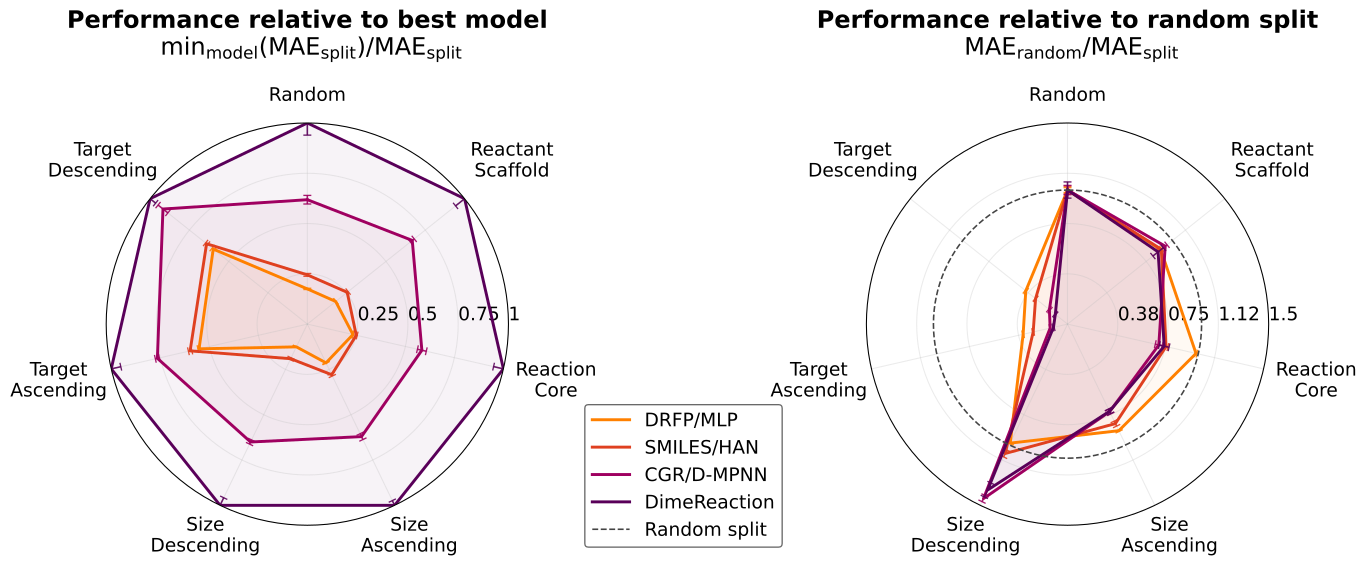
Comparison of OOD performance (higher is better); mean standard deviation over 9 seeds. Left: radar plot showing the MAE of each model scaled by the MAE of the best-performing model on the respective split. Right: radar plot displaying each model’s MAE scaled by that model’s MAE on the random split.#
To construct this figure we:
Downloaded all metrics for the relevant
(model, split, seed)tuples from W&B into a single CSV file.Parsed that CSV into an aggregated CSV containing the mean and standard deviation for each
(model, split)pair.Used Matplotlib to load the aggregated CSV and render the dual radar plots.
Step 6 – Extend the RDB7 benchmark (optional)#
Do you want to compare a new model head-to-head with the ChemTorch paper baselines on RDB7? Or do you want to try out a custom data splitter?
Adding a new baseline:#
Tune the hyperparameter of your model with the same settings as for the other models of the benchmark (see sweep/rdb7_fwd), add the optimal config to conf/saved_configs/chemtorch_benchmark/optimal_model_configs, and run the OOD benchmark with the same settings as in the ChemTorch paper!
Adding a new splitter#
Add a new entry to SPLIT_SPECS inside scripts/generate_data_split_configs.py (set file_name, prefix, and splitter fields), use the generator to create matching YAML files, and retrain all models in conf/saved_configs/chemtorch_benchmark/optimal_model_configs with the same settings as in the ChemTorch paper!