
Performance Curves#
Performance curves help quantify data efficiency and how models scale with dataset size. ChemTorch makes it straightforward to create such performance curves. This tutorial shows how by reproducing the performance curves from the ChemTorch white paper.
Note
This tutorial assumes you already found a set of “optimal” hyperparameters via sweeps (see Hyperparameter Sweeps) and want to reproduce experiments (see Reproducing Experiments).
The configs in conf/saved_configs/chemtorch_benchmark/optimal_model_configs are the fully resolved Hydra configs from those sweeps.
Step 1 — Select Dataset Sizes#
Since datasets are usually large, choose training fractions on a rough log scale. In the white paper we used the following:
subsample_fractions=(0.01 0.02 0.05 0.1 0.2 0.4 0.6 0.8 0.9)
Step 2 — Run benchmark#
To train a model on a fraction of the training data we specify data_module.subsample and set +data_module.subsample_splits='[train]' to only subsample the training dataset (validation and test sets stay fixed for comperability).
To train the CGR/D-MPNN model on 1% of the training data we would use the following command:
chemtorch -cd=conf/saved_configs/chemtorch_benchmark/optimal_model_configs -cn=cgr_dmpnn data_module.subsample=0.01 +data_module.subsample_splits='[train]' group_name=chemtorch_performance_curves
Adjust group_name as you like (useful for W&B grouping).
Below is a minimal shell script that runs a systematically sweeps over all models in conf/saved_configs/chemtorch_benchmark/optimal_model_configs and all training set sizes.
#!/usr/bin/env bash
set -euo pipefail

models=(cgr_dmpnn atom_han drfp_mlp ts_dimenet++ dimereaction)

base_cmd="chemtorch -cd=conf/saved_configs/chemtorch_benchmark/optimal_model_configs"
group_name="chemtorch_performance_curves"

models=(cgr_dmpnn atom_han drfp_mlp dimereaction)
subsample_fractions=(0.01 0.02 0.05 0.1 0.2 0.4 0.6 0.8 0.9)

for model in "${models[@]}"; do
  for frac in "${subsample_fractions[@]}"; do
     ${base_cmd} -cn=${model} \
        dataset.subsample=${frac} \
        +dataset.subsample_splits='[train]' \
        group_name=${group_name} \
        seed=0
  done
done
If you run on a cluster, you can turn this into a job submission script for parallel execution.
Step 3 — Collect metrics and plot#
Metrics are logged to W&B; download them as CSV, aggregate with pandas, and plot with matplotlib.
Example output from the ChemTorch paper (MAE vs. train fraction):
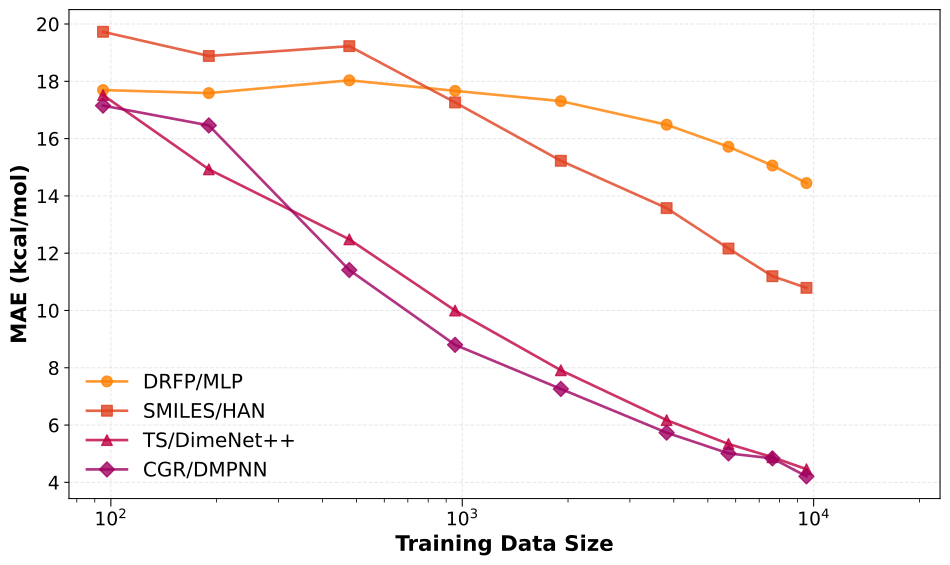
Performance curves (MAE vs. training set fraction) on RDB7.#
From the figure we see that Graph/3D models (CGR/D-MPNN, DimeReaction) achieve lower MAE at every data fraction and match the full-data performance of SMILES/HAN and DRFP/MLP with fewer than 1k reactions, underscoring stronger data efficiency. SMILES/HAN has a similar learning-curve slope but starts from a higher baseline, while fingerprint-based DRFP/MLP improves more slowly and remains less accurate throughout. The nearly linear trend on the log-scale x-axis shows no saturation at the largest fractions; more data should still help, though gains will be smaller than the 5-7 kcal/mol improvement observed when scaling from 1k to 10k reactions.